
Last updated on
Nov 6, 2026
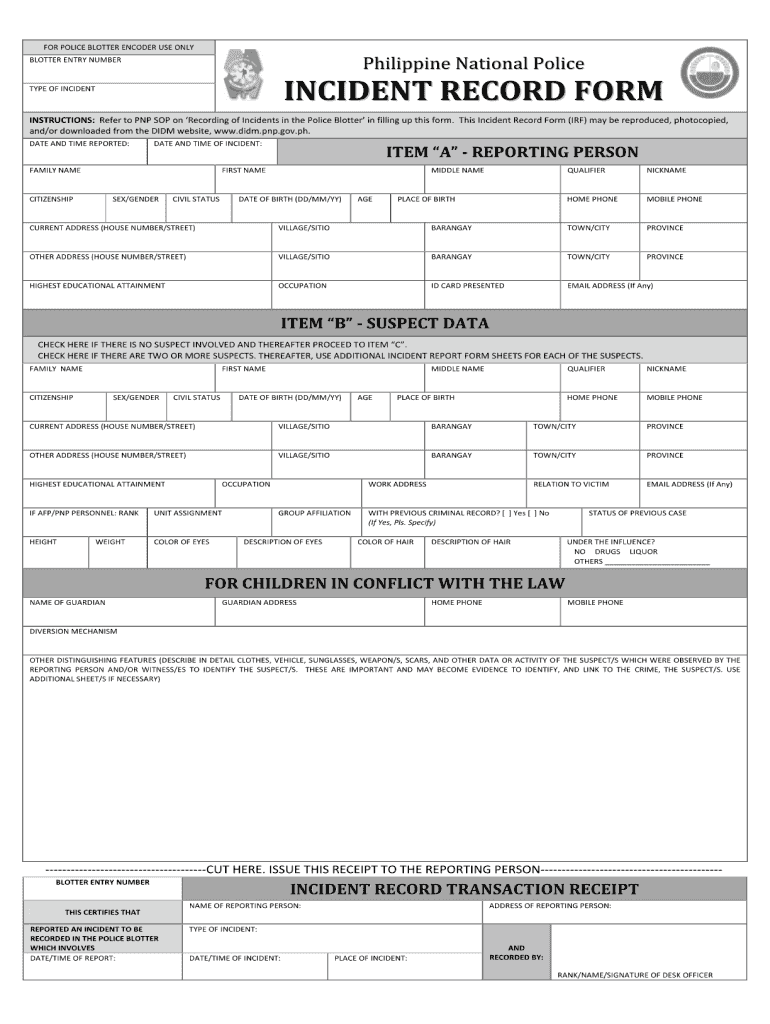
PH Incident Record Form free printable template
pdfFiller is not affiliated with any government organization

Fill out
Complete the form online in a simple drag-and-drop editor.

eSign
Add your legally binding signature or send the form for signing.

Share
Share the form via a link, letting anyone fill it out from any device.

Export
Download, print, email, or move the form to your cloud storage.
Why pdfFiller is the best tool for your documents and forms


End-to-end document management
From editing and signing to collaboration and tracking, pdfFiller has everything you need to get your documents done quickly and efficiently.
Accessible from anywhere
pdfFiller is fully cloud-based. This means you can edit, sign, and share documents from anywhere using your computer, smartphone, or tablet.
Secure and compliant
pdfFiller lets you securely manage documents following global laws like ESIGN, CCPA, and GDPR. It's also HIPAA and SOC 2 compliant.
What is PH Incident Record Form
The PH Incident Record Form is a document used by organizations to record and report incidents involving health and safety matters.
pdfFiller scores top ratings on review platforms




It was good. Hard to edit one document due to not being able to insert words. It was a lot easier & more convenient than finding a typewriter or printing the form having to use white out for goofs.
I had an issue and emailed the company and not only did 2 different people respond immediately they resolved my issue within a few hours of me sending the email. I’ve never seen that quick of a response before. Very impressive.
Who needs PH Incident Record Form?
Explore how professionals across industries use pdfFiller.

PH Incident Record Form is needed by:
-
Health and safety officers
-
Facility managers
-
Employees reporting incidents
-
Occupational health practitioners
-
Compliance officers
-
Legal teams addressing workplace incidents
Comprehensive Guide to PH Incident Record Form
What is the PH Incident Record Form?
The PH Incident Record Form is a crucial document used for incident reporting within various organizations. It serves as an official record that captures essential details of incidents, facilitating proper evaluation and follow-up actions. Accurately completing this form is vital as it ensures incidents are documented confidently, providing a foundation for organizational learning and compliance with legal standards. This form is intended for employees, employers, and professionals in fields requiring thorough incident management.
Purpose and Benefits of the PH Incident Record Form
The primary purpose of the PH Incident Record Form is to standardize the reporting of incidents, which can significantly enhance transparency and accountability within an organization. By formally documenting incidents, both individuals and organizations can reap numerous benefits, including improved safety protocols and risk management. Timely submission of this form can also influence outcomes by ensuring that incidents are addressed promptly and effectively.
Key Features of the PH Incident Record Form
The PH Incident Record Form boasts several key features designed to streamline incident documentation. Key functionalities include required fields for capturing critical information, which helps create comprehensive records. Users can fill out the form digitally, benefiting from customization options that enhance user experience. Additionally, the layout is intuitive, ensuring that users can navigate through sections with ease, further aiding in thorough documentation.
Who Needs the PH Incident Record Form?
The PH Incident Record Form is required by various groups, including employees involved in incident management and employers responsible for oversight. Specific situations that necessitate completing this form might include workplace accidents, safety violations, or incidents that could result in liability. Understanding legal obligations concerning incident reporting is essential, as any failure to document incidents appropriately can have regulatory implications.
How to Fill Out the PH Incident Record Form Online
Filling out the PH Incident Record Form online involves several straightforward steps. First, access the form through the designated online platform. Next, navigate through the key fields, providing accurate information in each required section. Ensure you review your entries for completeness and correctness before finalizing the form. Following these steps will enhance the accuracy and reliability of the incident documentation.
Submission Methods and Delivery Options for the PH Incident Record Form
After completing the PH Incident Record Form, there are various submission methods available. Users can submit the form online, by fax, or by traditional mail, depending on their convenience and organizational requirements. Be sure to confirm the appropriate delivery address for your jurisdiction and any associated submission deadlines or fees to avoid delays in processing.
What Happens After You Submit the PH Incident Record Form?
Once you have submitted the PH Incident Record Form, the post-submission process begins with the acknowledgment of receipt. You may receive confirmation that your submission was successfully processed. It is also essential to monitor the progress of your submission, allowing you to address any concerns or issues that may arise during the review process, such as requests for additional information.
Security and Compliance When Using the PH Incident Record Form
Security is a paramount concern when dealing with the PH Incident Record Form. Users can be assured that their data is protected through advanced measures, including 256-bit encryption. Additionally, adherence to regulations such as HIPAA and GDPR ensures that incident documentation remains compliant with necessary privacy standards. Prioritizing security is crucial for maintaining the integrity of the reporting process.
How pdfFiller Helps with the PH Incident Record Form
pdfFiller provides a comprehensive solution for managing the PH Incident Record Form efficiently. Through this platform, users can simplify the process of filling out, editing, and submitting the form. Features like eSignature capabilities enhance the workflow, while effective document management tools ensure that all incident records are well organized for future reference. Experience a seamless document-handling journey by leveraging pdfFiller’s capabilities.
Ready to Complete the PH Incident Record Form?
Utilize pdfFiller’s services to enhance your experience when completing the PH Incident Record Form. The platform offers a secure, user-friendly interface that makes digital form filling straightforward. By choosing pdfFiller, you can efficiently manage your forms online, ensuring an effortless documentation process.
How to fill out the PH Incident Record Form
-
1.Begin by accessing the pdfFiller platform and logging into your account or creating a new one if necessary.
-
2.Once logged in, search for the 'PH Incident Record Form' in the search bar or browse through the forms available.
-
3.Click on the form title to open it in the editor interface. Familiarize yourself with the layout and field types displayed.
-
4.Before starting to fill out the form, ensure you have all relevant information at hand, such as the date of the incident, names of individuals involved, and detailed descriptions of the events.
-
5.Navigate through the form using your mouse or keyboard to complete each field. Use the text boxes to input dates, names, and descriptions, and select options from dropdown menus where applicable.
-
6.If you need to attach any supporting documents, look for the upload button within the pdfFiller interface to include files such as images or additional forms.
-
7.After filling out all fields, carefully review the information for accuracy and completeness. Utilize the 'Preview' option if available to double-check your entries.
-
8.Once you are satisfied with the form, save your work using the 'Save' button. You can also choose to download it in PDF format for your records.
-
9.Finally, submit the form through the appropriate channels indicated within your organization or by using the submit function in pdfFiller if applicable.

Who is eligible to fill out the PH Incident Record Form?
Any employee or representative of a workplace can fill out the PH Incident Record Form to report incidents. Organizations typically designate specific personnel, such as health and safety officers, to manage the submission process.
Are there any deadlines for submitting the PH Incident Record Form?
Most organizations require the PH Incident Record Form to be submitted as soon as possible after an incident occurs. Check your organization's policies for specific timelines.
What methods can I use to submit the PH Incident Record Form?
The form can be submitted electronically via email, through an internal submission system, or physically handed to the designated personnel, depending on your organization’s procedures.
What supporting documents do I need for the PH Incident Record Form?
Depending on the incident, you may need to include documents such as photos, witness statements, and prior incident reports. Always verify with your supervisory team for specific requirements.
What are common mistakes to avoid when filling out this form?
Common mistakes include incomplete fields, incorrect dates, and lack of signatures. Ensure all required fields are filled and double-check information for accuracy before submission.
What is the processing time for submitted PH Incident Record Forms?
Processing times can vary based on the organization’s protocols and urgency of the incident, but typically, it may take anywhere from a few days to several weeks to receive feedback.
What should I do if the form is denied or requires changes?
If your PH Incident Record Form is denied or requires modifications, review the feedback provided, make the necessary changes, and resubmit promptly to avoid delays in processing.
Related Content
Related Forms



Related Catalogs
Get the latest insights from our blog


If you believe that this page should be taken down, please follow our DMCA take down process
here
.
This form may include fields for payment information. Data entered in these fields is not covered by PCI DSS compliance.